Migrating Legacy UI to Figma-Designed React Components
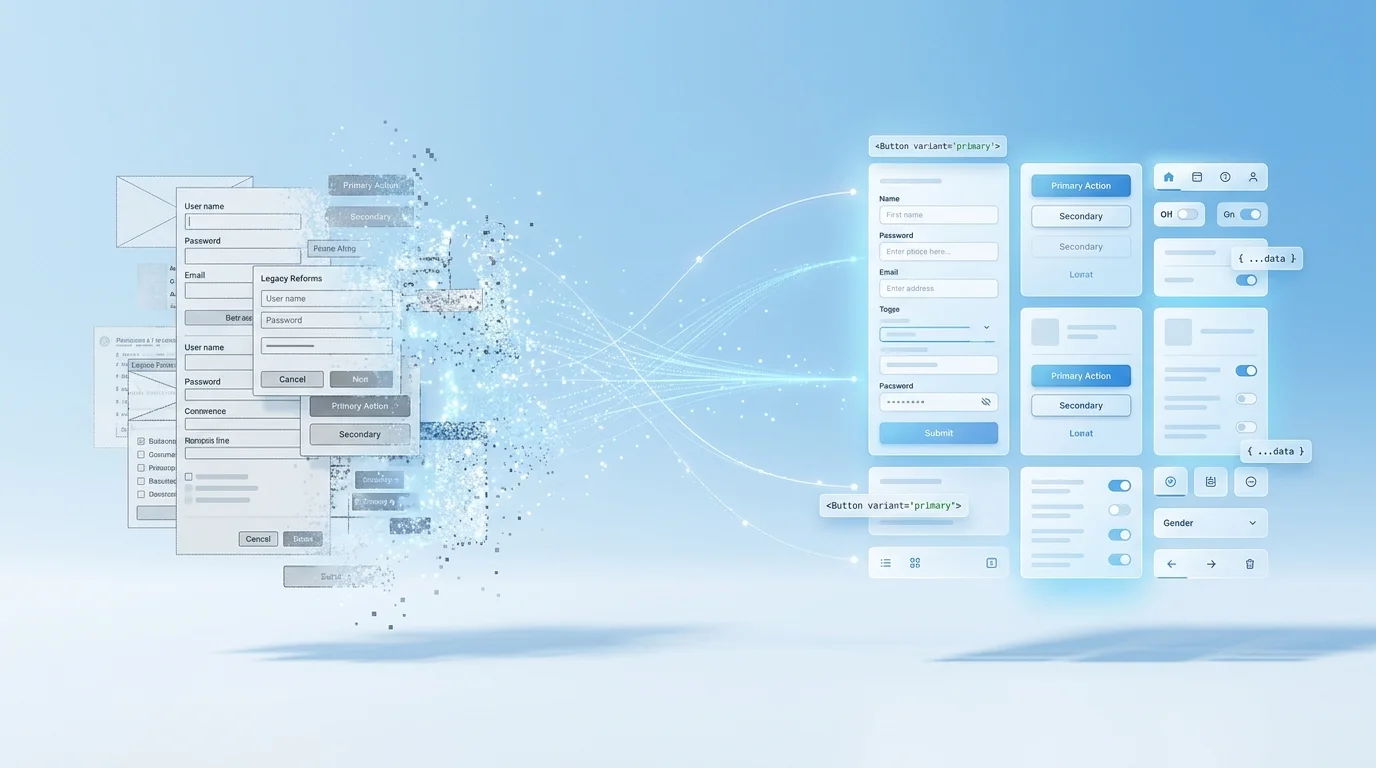
The Legacy UI Problem
Your product works. It has paying customers, active users, and business processes that depend on it. It also has a frontend built five years ago with jQuery and Bootstrap 3, or Angular 1, or a PHP template system that renders server-side HTML with scattered JavaScript. The design is inconsistent. The codebase is fragile. Every new feature takes longer than it should because developers are fighting the framework rather than building on top of it.
Your design team has produced beautiful Figma files showing what the product should look like. The question is not whether to modernise — it is how to modernise without breaking a working product, disrupting active users, or committing to a multi-year rewrite that may never ship.
This article describes the incremental migration strategies we use to move legacy frontends to Figma-designed React components — safely, progressively, and without the risks of a big-bang rewrite.
Why Big-Bang Rewrites Fail
The temptation is to rebuild the entire frontend from scratch. Start a new React project, implement all the Figma designs, and switch over when it is ready. This approach fails for predictable reasons:
- Timeline underestimation: The legacy UI contains hundreds of edge cases, conditional logic, and business rules that are visible in the code but not in the Figma designs. Reimplementing all of them takes far longer than anticipated.
- Feature parity paralysis: While the rewrite is in progress, the legacy application continues to evolve — new features are added, bugs are fixed, workflows change. The rewrite must constantly chase a moving target.
- Big-bang risk: Switching from the old system to the new system in a single deployment is high risk. If the new system has issues, rolling back means losing all the new work. If it has many issues, you may need to maintain both systems simultaneously.
- Team morale: A rewrite that takes 12 months instead of the estimated 6 demoralises the team. Progress feels invisible because nothing ships until everything ships.
The Strangler Fig Pattern for Frontend
The strangler fig pattern — originally described for backend system migration — works equally well for frontend modernisation. The idea is simple: instead of replacing the entire old system, you wrap it with a new system and gradually replace individual parts. The old and new systems coexist, with the new system slowly taking over until the old system is entirely consumed.
For frontend migration, this means:
- Establish the React shell: Set up a React application that wraps the existing legacy UI. The legacy pages continue to render as they always have. The React application provides the outer chrome — navigation, layout, shared state — while the legacy content renders within it.
- Migrate one page at a time: Select a page or feature area with clear boundaries and rebuild it in React using the Figma designs. When the new version is ready, route traffic to it. The legacy version can remain available as a fallback.
- Share state carefully: The React shell and the legacy content need to share certain state — the authenticated user, navigation context, feature flags. We establish a lightweight bridge that allows state to flow between the two systems without coupling them tightly.
- Repeat until complete: Each sprint migrates another page or feature. The legacy surface area shrinks steadily. Users see progressive improvements rather than waiting for a single large release.
Technical Strategies for Coexistence
CSS Isolation
The single biggest technical challenge in running old and new UI side by side is CSS conflicts. Legacy stylesheets use global selectors, broadly-scoped class names, and CSS resets that interfere with modern components. Modern components use utility classes or CSS-in-JS that may conflict with legacy styles.
We use multiple strategies to manage this:
- CSS Modules or CSS-in-JS: New React components use scoped styling that cannot leak into or be affected by legacy styles. Every class name is locally scoped by default.
- Shadow DOM for extreme isolation: In cases where CSS conflicts are particularly severe, we render new components inside Shadow DOM boundaries, providing complete style isolation.
- Legacy style containment: We wrap legacy content in a container with
all: initialor a CSS scope that prevents legacy resets and global styles from affecting modern components outside their boundary. - Gradual legacy CSS removal: As pages are migrated, we remove the corresponding legacy CSS. We track which legacy stylesheets are still in use and systematically deprecate them as their consumers are replaced.
Routing Coexistence
Legacy applications often use server-side routing (PHP pages, Rails views, Express templates) or legacy client-side routing (Angular 1 $routeProvider, Backbone Router). The new React application uses React Router or Next.js routing. These routing systems must coexist:
- Migrated routes are handled by the React router
- Non-migrated routes fall through to the legacy routing system
- Navigation between old and new pages works seamlessly from the user's perspective
- Shared navigation components (header, sidebar) are implemented once in React and rendered on both old and new pages
Component Islands
Not every migration starts with full-page replacement. Sometimes the most valuable first step is embedding modern React components within legacy pages — what some frameworks call "component islands." A legacy dashboard page might receive a new React chart component while the rest of the page remains legacy. A legacy form page might get a new React multi-step wizard while the surrounding layout stays unchanged.
This approach delivers visible improvements immediately, builds team confidence in the migration approach, and establishes the technical patterns (mounting React within legacy pages, sharing state, handling CSS isolation) that full-page migration will rely on.
Progressive Rollout
We use feature flags to control the rollout of migrated pages. When a new React page is ready, it is deployed behind a feature flag and initially shown to a small percentage of users or specific test accounts. Metrics are monitored — error rates, performance, user behaviour — before expanding the rollout. If issues are discovered, the flag is disabled and users are returned to the legacy version instantly.
This eliminates the deployment risk that makes teams hesitant to ship migration work. Every migrated page can be rolled back in seconds without a code deployment. The team ships with confidence rather than anxiety.
Measuring Progress
Frontend migrations stall when progress is invisible. We maintain a migration dashboard that tracks:
- Percentage of pages/routes migrated to React
- Percentage of user sessions served by new components vs. legacy
- Legacy CSS bundle size (which should decrease as pages are migrated)
- Performance metrics for migrated vs. non-migrated pages
- Accessibility scores for migrated pages
This visibility keeps stakeholders informed and gives the team concrete evidence that the migration is progressing — even when individual sprints feel incremental.
When to Start
The best time to start a frontend migration is before the legacy UI becomes a crisis. If your team is already spending more time working around framework limitations than building features, the migration will pay for itself faster than you expect. If your legacy UI has known accessibility issues, a migration gives you the opportunity to fix them systematically rather than patching them in a framework that makes compliance difficult.
If you are considering migrating a legacy frontend to modern React components based on Figma designs, book a free consultation. We will assess your current codebase, recommend a migration strategy, and give you a realistic timeline for the transition.
 End-to-End Custom Solutions
 Business Process Web Apps
 API Modernisation